

Connections
Understand how licenses and connections work together to connect your trading accounts.
What You'll Learn
Licenses = Connections
Your plan includes equal numbers of both
One EA per account
A single EA handles all symbols on a trading account
Flexible system
Switch accounts freely—slots release when you disconnect
How It Works
TradeSgnl uses a license-based system. Each plan includes licenses equal to your maximum concurrent connections:
Licenses
Unique identifiers to authenticate your EA with TradeSgnl.
Connections
Number of MT5 terminals that can be connected simultaneously.
| Plan | Licenses | Max Connections |
|---|---|---|
| Starter | 1 | 1 |
| Advanced | 3 | 3 |
| Professional | 10 | 10 |
One EA Per Account
You only need one connection per trading account. A single EA instance handles all symbols and trades on that account—attach it to any chart.
Any Chart
Attach the EA to EURUSD, BTCUSD, or any other chart—it handles all symbols.
Unlimited Symbols
Trade GBPJPY, XAUUSD, NAS100—all from that single EA instance.
Efficient Design
One connection per account, unlike platforms requiring one EA per symbol.
Flexibility & Examples
Connect multiple accounts using the same license—as long as you don't exceed your concurrent connection limit.
Multi-Device
Use the same license on your home PC and VPS simultaneously.
Flexible Switching
Connection slots release on disconnect—switch accounts freely.
Managing Connections
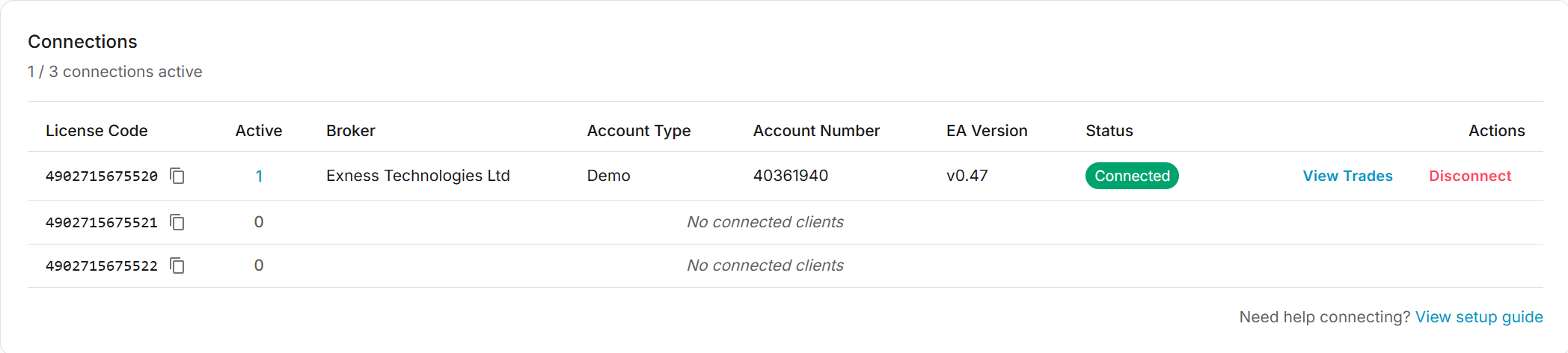
View and manage your connections from the TradeSgnl Portal:
View Trades by Account
Remote Disconnect
Need Additional Help?
Our support team is ready to assist you with any questions you might have.