
Trade Copier
Copy every trade from one MT5 account onto your others. Pick a master and targets, choose sizing, and opens, closes and stop loss moves follow automatically.
Copies follow the master within seconds. Trade Copier uses the accounts and the EA you already have connected, so there's nothing new to install.
Every trade, not just signals
Trades you place by hand on the master copy the same way as trades from your alerts.
Sized for each account
Fixed lots, a multiple of the master's size, or scaled to each account's equity.
A record of every copy
See what was copied, what wasn't, and why.
Advanced and higher
Trade Copier is included on the Advanced and Professional plans. It works with MT5 accounts running EA 0.71 or newer, on both the master and the targets.
Create a Trade Copier
Open Trade Copier. In your portal, open Trade Copier under Trading and click New Trade Copier.
Pick the master and targets. Choose the account to copy from on the left, and tick the accounts that copy it on the right. Click Continue.
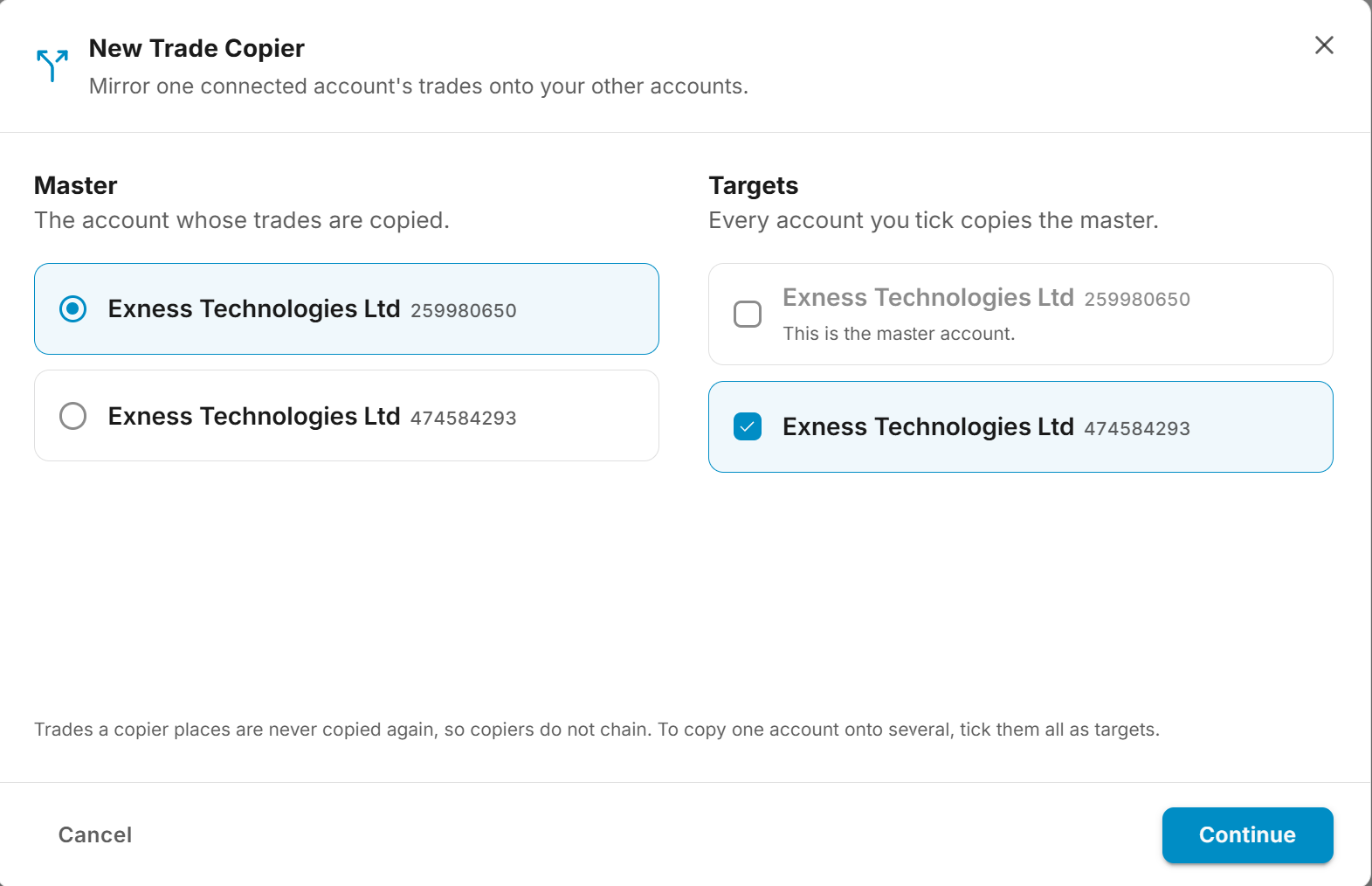
Only accounts that are connected right now are listed. Each target becomes its own Trade Copier, so you can pause or change them one at a time.
Set sizing and symbols. Choose how each copy is sized. To copy only some symbols, list them, spelled the way the master's broker names them. Leave it empty to copy everything. If the target's broker names symbols differently from the master's, turn on symbol mapping here too. Click Create Trade Copier.
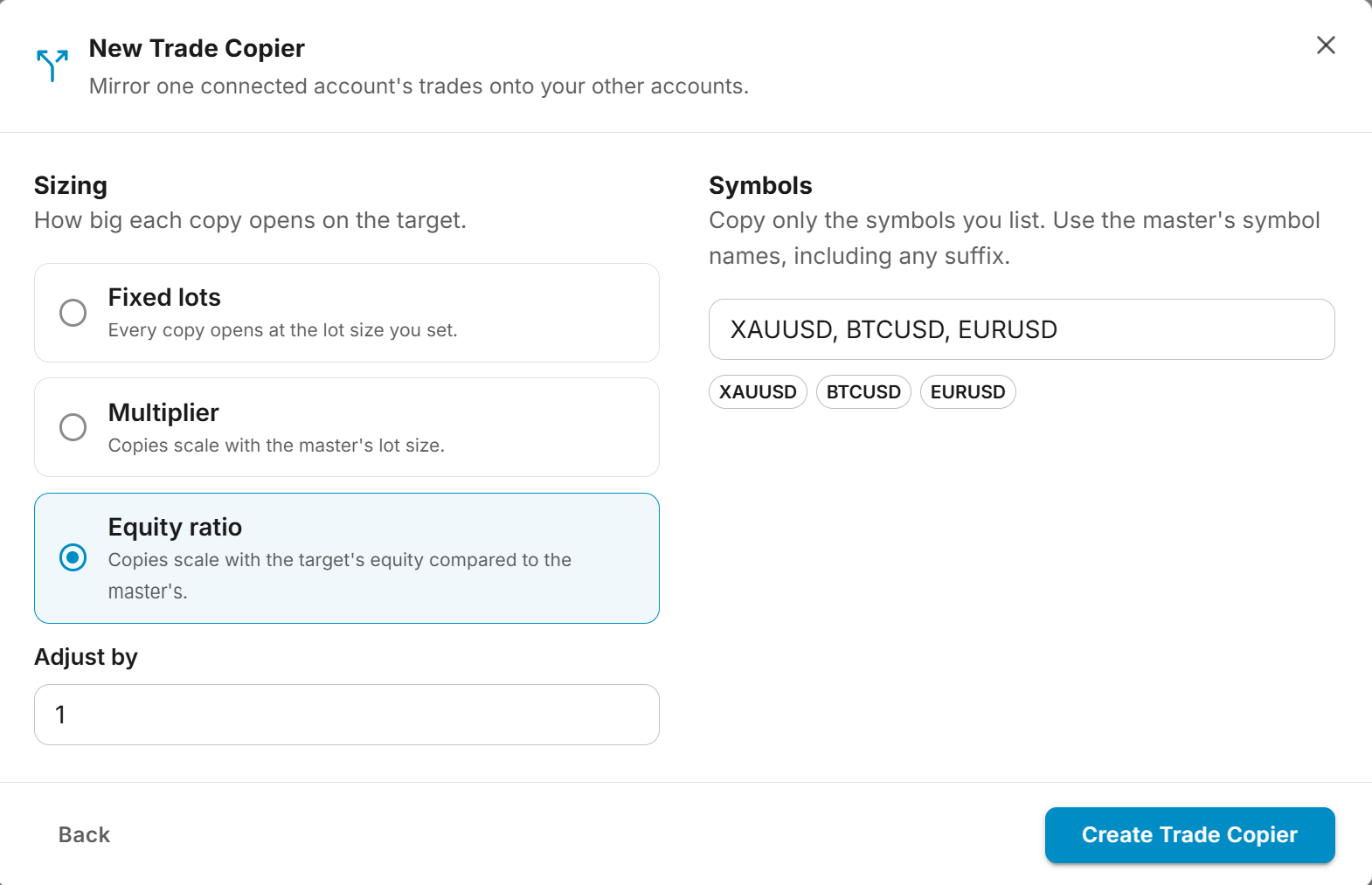
New Trade Copiers are named Copier 1, Copier 2 and so on. Click the pencil next to the name to rename one.
Sizing
| Mode | What it does |
|---|---|
| Fixed lots | Every copy opens at the lot size you set. |
| Multiplier | Copies scale with the master's lot size. 0.5 halves it, 2 doubles it. |
| Equity ratio | Copies scale with the target's equity compared to the master's, read at the moment of each trade. Adjust by scales the result further. |
A copy that works out smaller than the broker's minimum lot isn't opened. It's never rounded up, so a copy never trades more than your sizing asks for.
Symbol Mapping
Brokers don't always name an instrument the same way. If the master trades EURUSD and the target's broker lists EURUSD.m, the target rejects the copy with error 6007 Invalid Symbol. Each Trade Copier has its own Symbol mapping for this, under Symbols in the New Trade Copier dialog and in Edit settings.
Turn the switch on and fill in whichever of these you need:
- Auto-match broker symbols lets the target's EA trade the one clear match itself when its broker doesn't list the master's symbol, such as
EURUSD.mforEURUSD. It works on a difference in case, prefix or suffix, and rejects the copy when two symbols could fit. It's the quickest fix when the target's broker adds a suffix to everything. If the target license already has auto-match on, it applies to copies whatever this switch says. - Prefix and Suffix are added to every symbol the rows below don't name. A suffix of
.msendsEURUSDon the master asEURUSD.mon the target. - Mapping rows rename one symbol exactly. The left side is the symbol as the master writes it, the right side is the target's name, for example
XAUUSDtoGOLD. Names are matched exactly, including case.
A row wins over the prefix and suffix for the symbol it names, and both win over auto-match. A Trade Copier with no mapping of its own, or one that leaves a symbol alone, follows the target license's Symbol Mapping, exactly as before.
Because the mapping belongs to the Trade Copier and not to the license, two targets on the same license can each name symbols their own way, and the Signal Modifier mapping used for your TradingView alerts is never touched. Switching a mapping off keeps your rows for when you switch it back on.
The symbol filter uses the master's names
The symbol filter is checked against the master's symbol, before any renaming. List EURUSD, not EURUSD.m, if EURUSD is what the master trades.
Changes apply to the next copy. Open copies close on the symbol they opened with.
When a copy is rejected for its symbol anyway, the suggestion under it in Signal Logs and Alert History, and in the alert email and Telegram message, opens this Trade Copier's Edit settings with the suggested row or auto-match already filled in. Nothing is saved until you click Save changes.
What's Copied
- Opens. Same symbol, same direction, at your sizing. The copy opens with the master's stop loss and take profit already on it.
- Closes and partial closes. Closing part of the master's trade closes the same share of the copy.
- Stop loss and take profit changes. Moving or removing a level on the master does the same on the copy, at the same price. Trailing stops and breakeven follow too.
Pending orders aren't copied until they fill. The fill is then copied at the target's market price.
Copies carry a TSC comment followed by the master's account number, so you can find them in MT5. Symbols are renamed for the target by the Trade Copier's own symbol mapping and, where that leaves a symbol alone, by the target license's Symbol Mapping, so EURUSD on the master still copies to EURUSD.pro on the target.
Leave trailing off on target accounts
A target's own EA settings still apply to copies. If it has trailing or breakeven on, it fights the stop the master sends. Set trailing on the master only.
Reversing on a netting account
On a netting account, a reversal closes one side and opens the other in a single step, and nothing is copied. On a netting master, close and then open as two separate trades.
Timing
- Entries more than 30 seconds late are skipped, so a copy never opens at a price that has already moved.
- The target has to be connected when the master opens. Nothing is queued. A trade the target misses is recorded as Missed and isn't opened later.
- Closes always go through, even on a paused Trade Copier, as soon as the target can be reached.
- Stop loss and take profit changes wait. A level moved while the target was offline is set when it reconnects.
Managing a Trade Copier
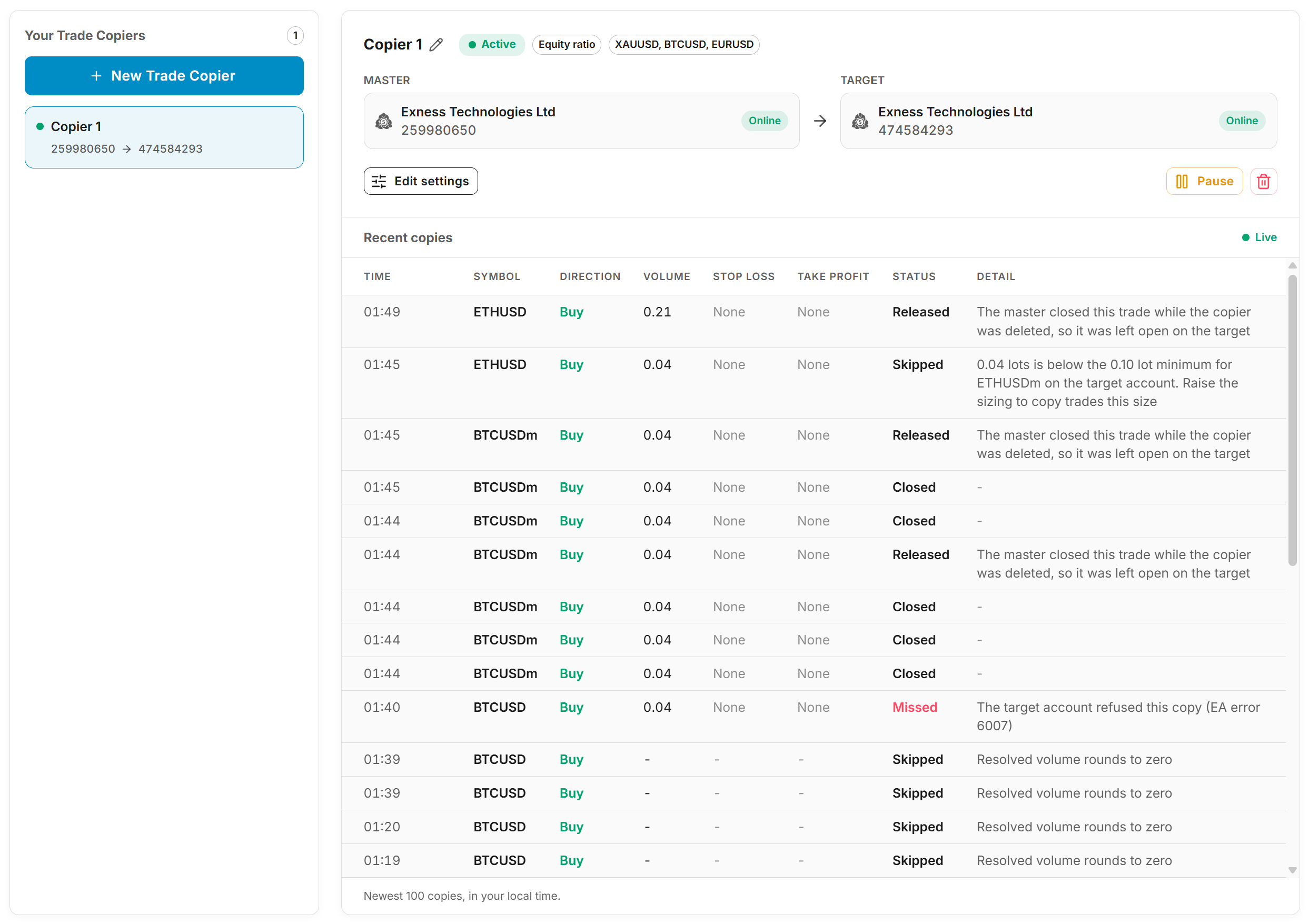
Select a Trade Copier to see its master and target, whether each is online, and every trade it has copied.
| Action | What it does |
|---|---|
Edit settings | Change the sizing, the symbols or the symbol mapping. Open copies keep the size they opened at. |
Pause | Stops new copies. Open copies still close when the master closes them. |
Resume | Starts copying new trades again. |
Delete | Stops copying. Open copies stay open on the target for you to manage. |
To copy from a different master, delete the Trade Copier and create a new one. If you create one again for the same master and target, it comes back with its name and history, and takes back its open copies. A copy whose master trade closed while it was deleted is left open for you to manage.
Activity
Each row is one trade on the master and what happened on the target. The Detail column says why when something wasn't copied.
| Status | Meaning |
|---|---|
| Open | Copied, and still open on the target. |
| Closed | Closed with the master. |
| Missed | Should have been copied and wasn't, usually because the target was offline or refused the order. |
| Skipped | Not copied on purpose, such as an entry more than 30 seconds late or a size below the broker's minimum. |
| Orphaned | The master closed while it was disconnected. The copy was closed when it reconnected. |
| Released | Left open on the target when the Trade Copier was deleted. |
| May be open, cannot be closed | The order went out but the copier lost track of it. Check the target account in MT5. |
Trades a symbol filter leaves out, and trades on a paused Trade Copier, don't appear.
The AI assistant can read your Trade Copiers and their activity. Ask it why a trade didn't copy.